Before the Boxes: A Smooth Move Starts with a Plan
When planning an office move, it’s easy to focus on furniture layouts, packing schedules, and the physical logistics of relocating your team. But one of the most critical and often overlooked components of any move is the technology and telecommunications infrastructure that keeps your business connected and productive.
Maintaining Operational Integrity During Transition
Complicating matters further, technology and telecom services often need to remain fully operational at the current office while being activated and tested at the new location. This overlap can require parallel systems, temporary setups, and precise coordination across vendors, service providers, and internal teams. Understanding that all this needs to happen while keeping employees productive and clients unaffected. Without careful planning, this phase can quickly become overwhelming and missing even one step can lead to costly delays or downtime.
To help simplify the process, we’ve created a downloadable technology move checklist designed to guide you through key tasks and timelines, so your transition to a new space is smooth, seamless, and fully connected from day one.
Experience Matters
Given the complexity involved, engaging an experienced technology partner can provide valuable guidance during an office move. The right partner helps assess requirements early, coordinate timelines across multiple providers, and proactively address potential gaps, reducing the risk of downtime or last‑minute surprises. Similarly, working with a moving company that is experienced in technology relocations ensures that sensitive equipment is handled, transported, and reinstalled properly. Together, these partnerships can help organizations navigate the transition with greater confidence, continuity, and control. With the right support, companies can stay focused on their business while navigating a complex transition more smoothly.
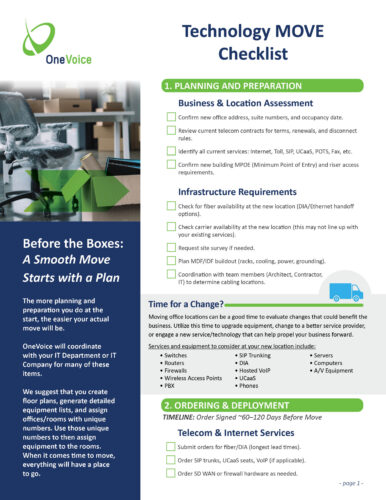
Technology MOVE Checklist
Planning & Preparation
The more planning and preparation you do at the start, the easier your actual move will be. OneVoice will coordinate with your IT Department or IT Company for many of these items. We suggest that you create floor plans, generate detailed equipment lists, and assign offices/rooms with unique numbers. Use those unique numbers to then assign equipment to the rooms. When it comes time to move, everything will have a place to go.
Business & Location Assessment
☐ Confirm new office address, suite numbers, and occupancy date
☐ Review current telecom contracts for terms, renewals, and disconnect rules
☐ Identify all current services: Internet, DIA, SIP/UCaaS, POTS, Fax, PRI
☐ Gather phone numbers, MAC addresses, and equipment inventory
☐ Confirm new building MPOE (Minimum Point of Entry) and riser access requirements
Infrastructure Requirements
☐ Check for fiber availability at the new location (DIA/Ethernet handoff options)
☐ Check carrier availability at the new location (this may not line up with your existing services)
☐ Request site survey if needed
☐ Plan MDF/IDF buildout (racks, cooling, power, grounding)
☐ Coordination with team members (Architect, Contractor, IT) to determine cabling locations
Ordering & Deployment (Order Signed ~60–120 Days Before the Move)
Telecom & Internet Services
☐ Submit orders for fiber/DIA (longest lead times)
☐ Order SIP trunks, UCaaS seats, VoIP (if applicable)
☐ Order SD‑WAN or firewall hardware as needed
☐ Schedule installations at new location
☐ Schedule disconnection of existing services
☐ Schedule port dates to move phone numbers
Cabling & Low‑Voltage
☐ Approve cabling maps (Cat6/Cat6A, fiber, WAP locations)
☐ Low Voltage Permit Required
☐ Schedule cabling installation before furniture arrives
☐ Confirm labeling requirements for patch panels and drops
Hardware Preparation
☐ Configure switches, firewalls, APs
☐ Prepare phones or softphone deployments
☐ Confirm power needs for all hardware (UPS systems, power strips)
Pre‑Move Validation
Circuit & Network Testing
☐ Validate fiber/DIA turn‑up
☐ Test bandwidth throughput
☐ Confirm firewall rules and NAT policies
☐ Test SD‑WAN failover (if applicable)
Voice & UCaaS Testing
☐ Confirm all numbers are assigned or ready for porting
☐ Test call flows: auto attendant, IVRs, queues, ring groups
☐ Validate voicemail, call recording, hunt groups
☐ Update and test E911 location data
General IT Testing
☐ Check Wi‑Fi coverage across entire floorplan
☐ Confirm VPN access
☐ Test printers, scanners, shared drives, and authentication systems
Move Closeout
Final Validation
☐ Backup configurations for all network devices
☐ Stage and label all hardware for easy setup
☐ Set up core network gear first (firewall → switches → APs)
☐ Confirm Internet is stable and routing is correct
☐ Test inbound/outbound calls
☐ Validate conference room systems
☐ Perform full end‑to‑end test: voice, data, Wi‑Fi, VPN
☐ Confirm E911 address routing is correct for all devices
☐ Update internal documentation, network diagrams and receive test results from cabling vendor
Disconnects & Billing
☐ Submit disconnect orders for old circuits (avoid double billing)
☐ Return any carrier‑provided equipment
☐ Update accounting with new telecom billing structure
Internal Communication
☐ Distribute user guides for phones/softphones
☐ Notify staff of any temporary limitations
☐ Provide helpdesk with updated troubleshooting paths
☐ Know who to contact for customer care